
Best AI Tools for Business Productivity: Reviews and Comparison of Notion AI, Merlin, and More
This AI tools reviews and comparison covers the best AI tools for business productivity such as Notion AI, Merlin, Tinywow, and Personal AI. Find features, pricing, and real-world use cases to enhance team efficiency.

Best AI Tools for Business Productivity: Reviews and Comparison of Notion AI, Merlin, and More
Did you know businesses adopting AI tools see up to 40% productivity boosts? If you're hunting for the best AI tools for business, this review and comparison of Notion AI, Merlin, Tinywow, and Personal AI shows you how to supercharge your workflows.
By the end of this AI tools buyer’s guide, you'll get unbiased AI tools reviews, side-by-side AI tools comparison on features, pricing, scalability, real-world use cases, and tips to pick and integrate the right ones for your small to medium-sized business.
Why the Best AI Tools for Business Are a Game-Changer
Picture this: your team spends hours every day on repetitive stuff like drafting emails, summarizing reports, or organizing data. That's time gone forever. AI tools flip the script. They automate those grindy tasks, so your people can focus on creative, high-impact work that moves the needle.

Here's the kicker: 70% of small and medium-sized businesses report real efficiency boosts after bringing in AI. Think about scaling pains too. As your team grows, bottlenecks hit hard, workflows break, and you're losing hours chasing chaos. Tools like these handle content creation, data crunching, and research in seconds. The result? Less burnout, happier teams, and actual growth. If you're still manual on basics, you're leaving money on the table.
Quick Overview: Top AI Tools for Business Productivity
Let's cut to the chase with a fast snapshot. These four stand out for SMBs because they tackle everyday productivity killers without needing a tech wizard on staff.
- Notion AI turns your all-in-one workspace into a smart powerhouse. It enhances notes, builds wikis, and automates databases on the fly.
- Merlin acts like a browser sidekick, perfect for quick research, writing, and task zaps right where you work.
- Tinywow keeps it simple and free, a no-fuss suite for editing PDFs, tweaking images, or converting files.
- Personal AI gets personal, cloning your business voice from your own data for custom workflows.
Each one integrates AI to automate tasks, amp up content, and smooth out operations. More on that ahead.
Notion AI Review: Features, Pricing, and Business Use Cases
Notion AI feels like a brainy assistant baked into your favorite workspace app. Key features include AI writing that drafts full pages from prompts, smart summarization for long docs or meetings, and database magic that queries your data like SQL without code.
Pricing starts at $10 per user per month on top of Notion's base plans. It scales beautifully for teams, no extra headaches.
For business, it's gold in project management. Running client campaigns? AI auto-generates status updates from meeting notes. Knowledge bases? It pulls insights from scattered pages instantly. Pros: zero learning curve if you're already on Notion, seamless integration. Cons: locked into their ecosystem, so switching hurts.
Users rave about it. One SMB marketing firm shaved off 20+ hours a week on documentation. Game-changer for collaborative teams.
Merlin AI Review: The Multi-Tool Productivity Booster
Merlin's your Swiss Army knife in the browser. As a Chrome extension, it pops up for instant AI chats, deep web research, or drafting emails while you're in Gmail or Docs.
Free tier gets you started, Pro at $19 a month unlocks unlimited power. No app downloads, just works across tabs.
Teams love the cross-app vibe. Marketing pros scrape competitor sites and spit out campaign ideas in minutes. Sales reps draft personalized outreach from LinkedIn profiles. It cuts research time by 50%, per user stories.
Limitations? Browser-only, no native mobile. But for desk-bound workflows, it's a beast. Automates tasks effortlessly, keeps content flowing.
Tinywow and Personal AI: Free and Custom AI Tools Reviews
Tinywow nails the quick and free niche. No signup, just hit the site for AI-powered PDF edits, image tweaks, text generators, or file converters. Summarize a 50-page contract? Done in seconds. Crop photos for social? Instant. Perfect for one-off tasks in sales or ops.
It's fully free, no catches. Drawback: lacks deep customization or team sharing. Great starter for bootstrapped businesses.
Personal AI goes the other way, building custom bots from your emails, docs, and chats. It mimics your voice for replies or reports. Pro plan's $40 a month.
Excels in personalized setups, like Slack bots for customer service or Zapier-linked automations. Content teams use it for brand-consistent posts. Integrates smoothly, boosts workflows uniquely.
Both shine for specific needs: Tinywow for speed, Personal for tailoring.
AI Tools Comparison: Pricing, Scalability, and Integrations for SMBs
Time for the showdown. Here's a quick table to compare:
| Tool | Starting Price | Scalability (SMB Fit) | Key Integrations |
|---|---|---|---|
| Notion AI | $10/user/mo | Excellent (teams) | Native Notion apps |
| Merlin | Free / $19/mo | Good (browser teams) | Gmail, Docs, browser |
| Tinywow | Free | Solo/quick tasks | None (web-based) |
| Personal AI | $40/mo Pro | Strong (custom teams) | Slack, Zapier |
All handle SMB growth without breaking the bank. Notion and Merlin lead for collaborative teams; Tinywow wins budgets. Integrations? Notion's internal, Merlin's everywhere in-browser, others lean Zapier. Pick by need: tight budget gets Tinywow, team hubs go Notion.
Real-World Use Cases, Success Stories, and Limitations
Real talk: these tools deliver. An e-commerce shop used Merlin to speed campaigns by 30%, turning research hours into launch days. Agencies swear by Notion for client onboarding, auto-building briefs from emails.
One design firm cloned their style with Personal AI for mood boards, saving weeks. Tinywow? Freelancers edit client PDFs on the fly.
No tool's perfect. Learning curves bite early, especially Notion's quirks. Data privacy? Always check GDPR compliance. AI hallucinations happen, so double-check outputs.
Tips: pilot with free trials, train one team member first. Start small, scale smart.
AI Tools Buyer’s Guide: How to Pick the Best for Your Business
Ready to choose? First, nail your needs. Content and notes? Notion or Merlin. Custom voice or bots? Personal AI. Quick edits? Tinywow.
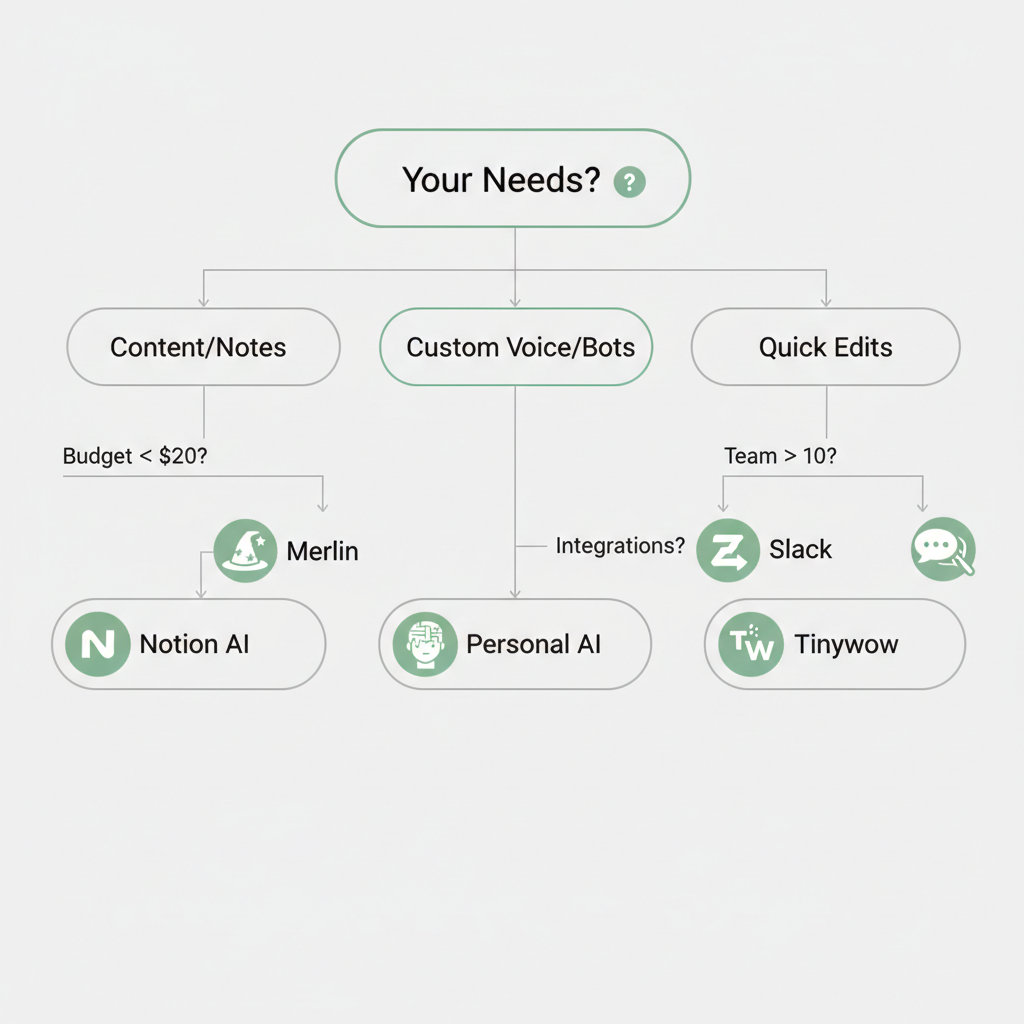
Budget checklist: under $20? Merlin free tier. Teams over 10? Notion scales best.
Test integrations: hook to Slack or Google Workspace? Zapier bridges most.
Implementation steps:
- Grab free trials (Notion, Merlin have 'em).
- Assign a test project.
- Measure time saved after two weeks.
Links: Notion AI, Merlin, Tinywow, Personal AI.
You've got the full scoop on the best AI tools for business, from reviews and comparisons to real-world wins. Choose Notion AI for workspaces, Merlin for versatility, or others based on your needs. Grab a free trial and watch productivity soar.
Related Articles

Best AI Automation Tools for Marketing 2026: Jasper vs AdCreative.ai vs Simplified Pricing Comparison
June 9, 2026

Best AI Tools for Twitter Marketing 2026: TweetHunter vs Postwise vs Typefully Comparison
May 27, 2026

Claude Cowork vs Zapier: Best AI Automation Tools Comparison for Business Productivity 2026
May 20, 2026

Claude Opus 4.7 Buyer's Guide: Features Pricing and Business Use Cases Comparison 2026
April 17, 2026