
Claude Cowork Review: Pricing and Setup for Gmail-Drive Automations in Business
Honest Claude Cowork ai tools review with pricing comparison, installation guide, connectors, and real workflows to automate your business tasks efficiently.

Drowning in endless Gmail emails and cluttered Google Drive folders? As business pros hunt for the best AI tools for business, this Claude Cowork review uncovers how this standout AI automation tool slashes manual tasks, saving hours weekly. You'll find pricing breakdowns and setup details right here.
Stick with me, and you'll nail Claude Cowork's pricing options, nail a step-by-step setup for Gmail and Drive automations, spot real-world workflows, and figure out if it's your next productivity boost.
What Is Claude Cowork? Your New AI Sidekick for Gmail and Drive
Claude Cowork is a solid AI-driven setup for automating Gmail and Google Drive tasks. It boosts productivity with tight integrations and workflows you can tweak to fit. Think of it as an intelligent agent that tackles repetitive stuff, organizing files, whipping up documents, pulling together research.
Businesses love it for streamlining ops without jumping between apps. What makes it pop? Those deep ties to Google Workspace. It hooks right into Gmail for searching and managing emails, Google Calendar for scheduling, and Drive for docs. Connectors cover Gmail, Drive, Slack too. Perfect for teams swamped by email chains or messy files.
Run it as a desktop app on macOS or Windows. That means easy access anywhere in your business setup. Customize with plugins, skills, connectors, commands, for your exact needs. No coding. Just build automations that grow with you. If you're knee-deep in client replies in Gmail or sorting project folders in Drive, this cuts the chaos. Hours of drudgery? Gone. It's like having a coworker who gets what you need before you say it.
Claude Cowork Pricing: Simple Plans That Fit Business Needs
Pricing should be straightforward when you're eyeing AI tools pricing comparison. Claude Cowork starts with a free tier for dipping your toes in. Paid plans unlock the good stuff. Quick look:
| Plan | Price | Usage Multiplier (vs. Free) | Best For |
|---|---|---|---|
| Free | $0 | Base | Basic testing |
| Pro | $20/month | 5x | Solo users or small teams |
| Max | $100/month | 20x | Heavy workloads |
| Team/Enterprise | Custom | Scaled | Larger groups with support |
Pro gives you full run of Cowork features. Great for solo folks or small teams handling daily Gmail sorts or Drive cleanups. Team plans scale with shared access and extra support.
Stack it against other automation platforms, and Claude Cowork shines for AI-focused Gmail and Drive work at a friendly entry price. Others nickel-and-dime per task. Here, you get unlimited runs within your plan's limits. That $20 Pro plan? Killer value for Google-heavy flows. No dev time wasted, the AI sorts the tough parts. Pick based on your volume: free to start, Pro for steady daily use.
Want more bang? Max handles big loads, and custom enterprise fits growing teams. I've seen small ops save big by ditching manual filing. Think about your weekly email grind, does 5x usage cover it?
How Do You Set Up Claude Cowork for Gmail and Drive? Step by Step
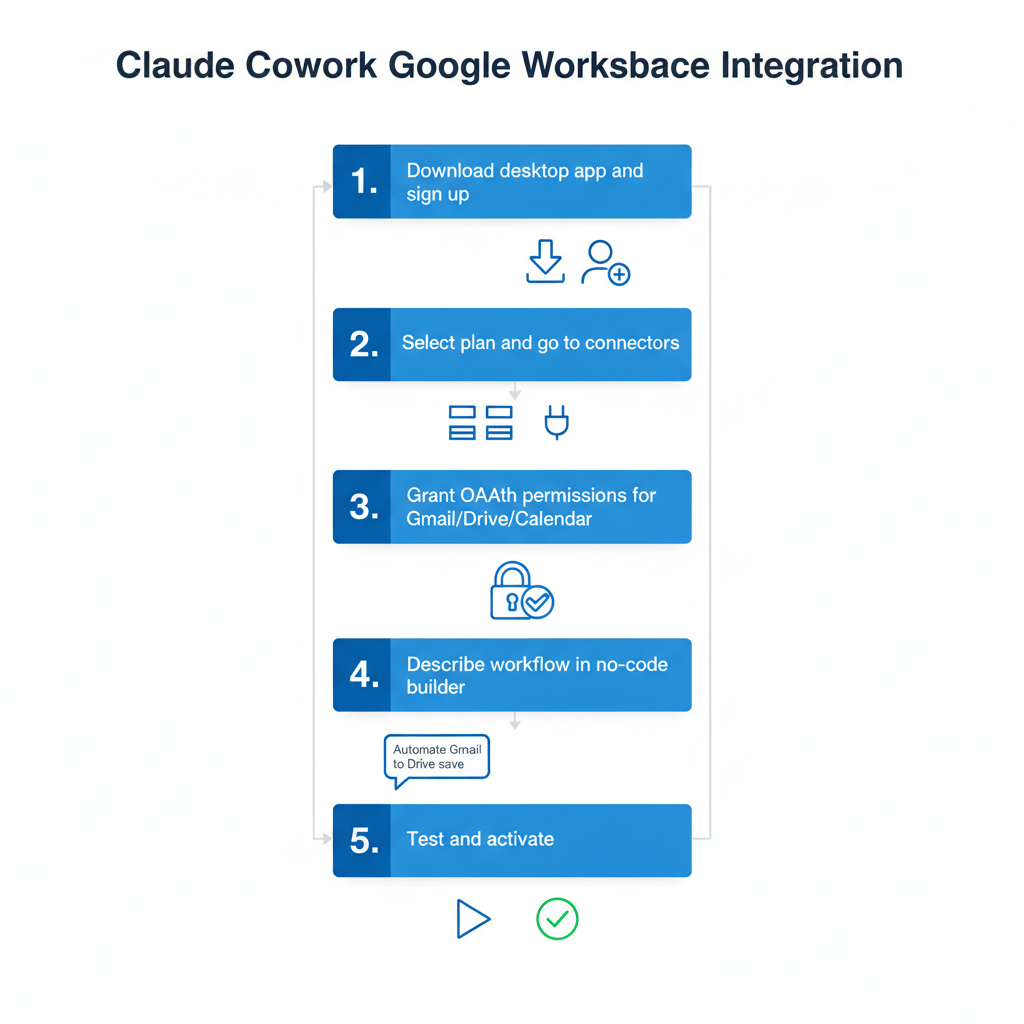
Setup's a breeze. Google Workspace links up fast through OAuth, no fuss. Busy pros get quick wins.
- Grab the desktop app for macOS or Windows. Sign up with your Claude account. Pick a plan, free to try, Pro at $20/month for the full kit.
- Hit the connectors area. Choose Google Workspace. Grant access to Gmail, Drive, Calendar. OAuth keeps it secure, no passwords needed.
- Jump into the no-code builder. Tell it what you want in plain English: "Sort Gmail invoices into Drive folders." It maps out steps, scan emails, pull data, make folders, file stuff.
- Plugins kick it up. Add custom logic through connectors and commands.
- Test on sample data. Run a batch, see emails labeled or Drive files shuffled. Tweak and go live.
Watch for pitfalls: Don't overdo permissions, read-only for sensitive spots. Connector hiccups? Check approvals; it always asks before big moves. Logs track everything, and a restart fixes most snags.
Your first automation? Under 10 minutes. Gmail and Drive play nice together, killing that app-switching headache. Imagine firing it up Monday morning, emails sorted before coffee's done.
5 Workflows That'll Transform Your Gmail and Drive Game
These real setups show Claude Cowork in action. Pick one, automate, save hours.
- Auto-label and archive by sender or project. Scans inbox, slaps on "Client-ABC" labels, archives junk. Focus on what matters.
- Smart Drive organization by content. Hits messy folders, reads docs, builds subfolders like "Q1 Reports," moves files. Multi-step magic.
- Gmail replies and follow-ups. Drafts answers to routine stuff, schedules via Calendar, logs to Drive. Hands-free.
- Invoice pull and file. Grabs Gmail attachments, extracts numbers with AI, drops organized sheets in Drive. Smooth chain.
- Email threads to meeting notes. Pulls chains, sums up points, spits out Docs. Max plan crushes heavy synthesis.

Google connectors make these seamless. Teams cut hours weekly. Tweak with plugins. Start basic, build chains, it keeps up. One user told me their Drive went from nightmare to neat in a week.
Is Claude Cowork Secure Enough for Business Data?
Security matters when AI touches your Gmail or Drive. Claude Cowork puts you in control: manage access per folder or connector. It asks before any big action.
OAuth links Google stuff securely, no stored passwords. Pick read-only for emails or folders. Logs catch every move, from files shifted to scans run. Great for audits.
Data's encrypted in transit and rest. AI blocks rogue generations. Plugins follow the rules. Enterprise adds team oversight.
Desktop focus keeps some processing local. No big breaches. Handle client data easy, approvals block slip-ups. Tackles automation worries square on.
The Verdict: Pros, Cons, and When to Pick Alternatives
In AI tools reviews, Claude Cowork nails Gmail-Drive focus. Straight talk:
Pros:
- No-code setup that's stupid simple
- Pro at $20/month, 5x free usage
- Deep Google hooks for Gmail, Drive, etc.
- Scales with multi-step tasks and plugins
- Does real work, organizes, synthesizes, mostly hands-off
- Solid desktop apps for Mac and Windows
Cons:
- Tricky workflows take practice; prompts need tuning
- Beta bits change fast
- Lower plans cap heavy use (Max fixes that)
- Steps feel measured, not lightning
Alternatives? Zapier zaps wide but skimps on AI smarts for emails. Make's cheap, but Google AI's lighter. Claude Cowork owns targeted flows, especially with approval safety.
Google fans? This is your pick.
Claude Cowork flips the script on Gmail-Drive drudgery. Grab the free plan, try a workflow, see the time melt away. What's stopping you from automating today?
Related Articles

Minitest AI QA Tools Buyer's Guide: Pricing Comparison and Mobile Testing Alternatives
July 15, 2026

Sora 2 vs Kling 3.0 vs Runway: AI Video Tools Pricing Comparison 2026
July 8, 2026

Claude Cowork vs Zapier vs Bardeen: AI Automation Tools Comparison for Business Productivity 2026
July 1, 2026

Best AI Tools for Twitter Management: Buyer's Guide, Reviews & Pricing Comparison 2026
June 16, 2026