
Gemma 4 OpenClaw Setup Guide: Best Free AI Tools Buyer’s Guide for Developers 2026
Discover how Google’s Gemma 4 transforms OpenClaw into a top free AI tool—full setup steps, performance benchmarks, and comparisons to paid options for business productivity.

Gemma 4 OpenClaw Setup Guide: Best Free AI Tools Buyer’s Guide for Developers 2026
Tired of shelling out for premium AI tools? What if you could deploy Google's Gemma 4 with OpenClaw, the best free AI tools for developers in 2026, entirely locally and at zero cost?
By the end of this Gemma 4 OpenClaw setup guide and AI tools buyer’s guide, you'll have a fully operational local AI agent system. Expect step-by-step instructions, performance notes, comparisons to paid alternatives, and troubleshooting tips. All to supercharge your development workflow without touching your wallet.
What Are Gemma 4 and OpenClaw? A Quick AI Tools Review
Google's Gemma 4 is a lightweight, open-source large language model family built for efficient local deployment. It comes in various sizes, from smaller ones that run on basic laptops to beefier variants for more power. Released under the Apache 2.0 license, it supports free commercial use. That opens doors for production workflows, no strings attached.
One standout feature? A generous context window that lets it handle big codebases or long chats without chopping things off. OpenClaw pairs perfectly as an open framework for building and running AI agents right on your machine. It hooks up smoothly with models like Gemma 4, transforming basic inference into smart agents for coding, analysis, or automation.
Together, they keep everything private, no data pings off to external servers. Gemma 4's built-in function calling works across sizes, so agents can reliably call tools for tricky tasks. This combo slashes costs to nothing while holding its own against paid tools in reasoning power.
Developers get customizable agents without subscriptions. Scale commercially worry-free. No wonder folks see this as a top pick for local AI setups in 2026.
What Are the Prerequisites for Gemma 4 OpenClaw Setup?
Before jumping in, make sure your system checks the boxes. Skip the headaches by confirming these basics:
- Hardware: Larger Gemma 4 models need at least 16GB RAM, which fits most modern dev machines. Grab a GPU for a big speed boost, NVIDIA with CUDA shines, but CPU works too, just slower.
- Software: Git for repos. Node.js via your package manager for OpenClaw.
- OS: Linux, Windows, macOS all play nice. Apple Silicon might need a few tweaks for peak performance.
- Other: Disk space for models. NVIDIA users, test with
nvidia-smito confirm drivers.
These keep the entry bar low. A mid-range laptop gets you in the game, thanks to Gemma 4's smart efficiency.
How to Install Gemma 4: Step-by-Step Guide
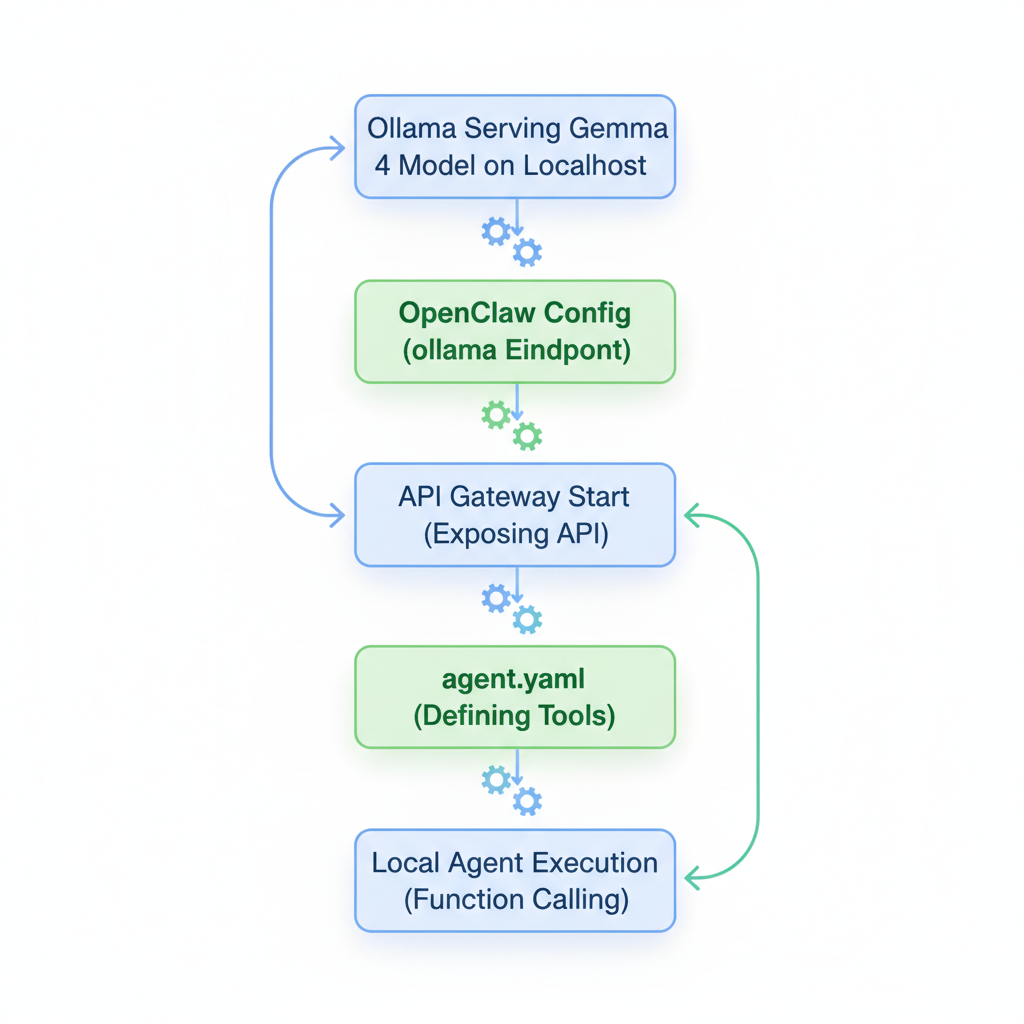
Kick off with Ollama for easy local serving, a go-to for Gemma 4. On macOS, brew install ollama. Linux and Windows? Grab the binary from Ollama's site and add to PATH.
Pull a model next. Go for something balanced like ollama pull gemma4:26b. Downloads fast on good internet. Check with ollama list.
Think about why this matters for devs. No more waiting on API calls during crunch time. Offline work? Check. Custom fine-tunes later? Easy.
Configuring OpenClaw with Gemma 4 for Local AI Agents
Gemma 4 humming? Time for OpenClaw. Global install: npm install -g openclaw. Init: openclaw onboard to set up your space.
Link to your model by editing ~/.openclaw/openclaw.json to specify the Ollama provider, your selected Gemma 4 model, and base URL for the local Ollama server.
Fire up the gateway: openclaw gateway start. API endpoint live.
Privacy locked in, all local. Add tools for git, data viz, whatever. Experiment. Build agents that fit your exact workflow, like auto-testing PRs or generating docs from code.
Gemma 4 Performance Benchmarks: Speed, Accuracy, and Efficiency
Real tests show Gemma 4 packs a punch. On everyday hardware, the bigger models crank out around 20-40 tokens per second. Matches cloud speeds, skips the bills.
Benchmark scores hold strong, especially in reasoning and function calling. Efficiency rocks too, memory stays manageable on 16GB setups. Quantized versions keep resource use light without big accuracy drops.
For dev work, it cuts hallucinations compared to tinier open models. Sustained runs? No sweat. Pair with OpenClaw, and agents feel snappy for code gen, debugging, even planning multi-step tasks.
Gemma 4 OpenClaw vs Paid AI Tools: Ultimate Buyer’s Comparison
Free under Apache 2.0. Zero vs $20+ monthly for ChatGPT or Claude. Full commercial freedom, no lock-in.
Privacy edges cloud big time, proprietary code stays put. Function calling matches paid agents. Context crushes many subs.
Trade-offs? Paid options handle images out of the box. Cloud scales forever, but meters costs and risks data.
Devs love local: tweak on the fly, offline, fast iterations. Scores close the gap to premium models, endless free runs.
Verdict: Gemma 4 OpenClaw for control and savings. Paid for fancy inputs. Your call, but for pure dev power, local rules.
Troubleshooting Common Gemma 4 OpenClaw Setup Issues
CUDA gripes first. nvidia-smi to verify. Versions off? Reinstall CUDA matching your driver.
Model won't load? Check space, paths in config. Ollama? ollama ps.
Slow? Consider quantization. Baseline 20-40 t/s. Optimization tweaks help.
OpenClaw config bugs? JSON indent in ~/.openclaw/openclaw.json. Restart gateway.
Apple Silicon? Ollama Metal. Logs: openclaw logs.
Other snags: Firewall block gateway? Ports open. Node version mismatch? Update. Ollama not serving? Restart service. Ping communities if stuck.
Congratulations, you've unlocked the best free AI tools 2026 offers via Gemma 4 OpenClaw. This AI tools review and buyer’s guide sets you up to build, test, and scale local agents smooth. Jump in. Tinker. Drop your wins (or woes) in comments. What's your first agent project?
Related Articles

Minitest AI QA Tools Buyer's Guide: Pricing Comparison and Mobile Testing Alternatives
July 15, 2026

Best AI Tools for Twitter Management: Buyer's Guide, Reviews & Pricing Comparison 2026
June 16, 2026

Best AI Tools for Twitter Marketing 2026: TweetHunter vs Postwise vs Typefully Comparison
May 27, 2026

Claude Opus 4.7 Buyer's Guide: Features Pricing and Business Use Cases Comparison 2026
April 17, 2026